




In June 2026, an ArcGIS Online update introduced a quiet change to how hosted feature layers behave and for a number of our clients, it turned into a proper whodunnit before we tracked down the cause. Most days, FME just keeps pace with these shifts without anyone noticing. This one was worth a closer look.
Hosted feature layers with more than 100,000 records started handing back fewer records than they actually held; cleanly, silently, no error in sight, looking for all the world like a complete dataset. It’s the kind of thing nobody catches until someone downstream asks why the totals don’t add up. So we went looking for the culprit, and for a way to keep client workflows moving while we were at it.
What We Found
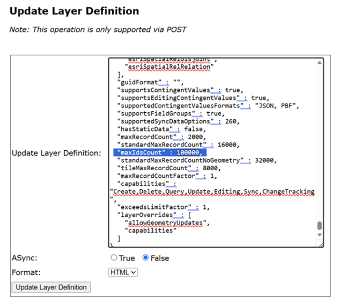
A field in the Feature Service’s Layer Definition called maxIdsCount had been set to 100,000 as part of the update. Cross that record count, and the rest of your data vanished, no error thrown, just a dataset that looked whole and wasn’t.
The fix looked obvious: raise maxIdsCount manually to 1,000,000, say. It worked. For a while. Then the field’s ceiling was set to 400,000 as part of further platform changes, which solved things for some clients and left others still well short.
Safe Software and Esri were already on the case together, working toward a permanent fix. We wanted something our clients could use right now.
A Temporary Fix, Built With HTTPCaller
Esri’s ArcGIS Feature Service Readers are themselves built on the ArcGIS REST API Query (Feature Service/Layer) endpoint, a well-documented, wide-open part of the platform. So instead of waiting on a new reader, we skipped straight to the source and used FME’s HTTPCaller transformer to talk to the ArcGIS REST APIs ourselves. That’s the underrated benefit of a genuinely open API: when one tool changes shape, the door underneath it is still standing wide open.
The workspace we put together did the following:
- Identified the total number of records in the Feature Layer
- Worked out how many calls were needed to pull all the data, based on the current record limit
- Queried all data from the Feature Layer
- Reassembled geometry and attributes into usable features
Was it pretty? No. It took a handful of HTTPCallers chained together to do the job a single Feature Service Reader usually handles without breaking a sweat, proof of just how much heavy lifting that reader quietly does for you. But it did the one thing that actually mattered… every feature came through. Not the first 100,000. Not the first 400,000. All of it.
Packaging it up as a Custom Transformer
Once the approach was proven, we took it one step further for clients who needed the same fix, packaging the whole workflow into a simple Custom Transformer. User Parameters handle the Feature Service URL, and it reads points, lines, and polygons alike, so it’s a single drop-in component rather than a bespoke workspace rebuilt from scratch every time.
Our fix was always meant to hold things over and Safe Software published their own transformer-based workaround for the same challenge, built on a similar idea and landing on the same outcome by a slightly different route. Good proof that Safe and Esri had this well in hand the whole time and, as it turns out, an even better fix was already on its way.
And that, really, is the fun of FME! Platforms change, sometimes in ways nobody sees coming, and no two workspaces or solutions ever look quite the same in response. A flexible toolset means you can keep moving.
Where things stand currently
Safe Software as expertly closed the loop. The fix is built into version 3.25.3 and newer of the packaged Esri ArcGIS Feature Service Readers and Writers, and Safe is recommending everyone migrate to the package as the primary integration going forward, it’s the version that’ll pick up any future REST API changes automatically. If you’re still on the shipped format or an older package version, this is a good moment to update.
Further reading
Safe Software’s known issue article
Esri ArcGIS Feature Service package (v3.25.3+) on FME Hub
Join FME Accelerator, our free, instructor-led 90 minute introduction to FME – Register Now