





Safe Software has kicked off 2026 with a release that quietly does a lot of heavy lifting. FME 2026.1 isn’t necessarily one of those “hold the front page” blockbuster releases but it’s the kind of update that, once you’ve worked with it for a week, you realise you can’t imagine going back.
Think of it like a really good All Blacks training block. Not flashy, just sharper, faster, more precise and ready for the big games ahead.
Here’s our Locus take on what matters most.
The Headlines
You Can Now Watch Your Data Move in Real Time
This one’s genuinely exciting for anyone who’s ever stared at a workspace wondering “is it doing anything?” during a long-running translation.
Live Feature Caching in FME Form means you can now inspect your data caches while a workspace is still running, no need to stop it, poke around, then start again. For complex workflows and streaming data, this is a significant quality-of-life improvement. And if you do stop a translation midway, your incomplete caches are retained. No more starting from scratch.
We’ve had more than one client describe debugging long-running workflows as “like trying to fix a car engine while the bonnet’s shut.” Consider it now unbolted.
FME Just Got an AI Superpower and it’s the MCPCaller Transformer
If you’ve been following the AI conversation you’ll know that MCP – Model Context Protocol – is becoming a big deal. It’s essentially the standard way AI systems talk to external tools and services.
The new MCPCaller Transformer lets FME connect directly to any MCP server, dynamically list the tools available, call them, and pull back structured JSON results, right inside your workflow. No coding, no workarounds, no middleware.
This is Safe Software making good on their “Any Data, Any AI, Anywhere” promise in a very tangible way. FME isn’t just processing your data anymore it’s becoming the bridge between your enterprise systems and the AI tools sitting on top of them.
We think this one’s going to have a long tail of exciting possibilities.
Microsoft Fabric Warehouse plugs straight in
For those navigating Microsoft’s modern data stack, this is welcome news. FME 2026.1 includes a new reader and writer for Microsoft Fabric Warehouse, with direct integration into OneLake (including Shortcuts to external sources like Amazon S3), and authentication via Microsoft Entra ID.
In simple terms, if your organisation is building on Microsoft Fabric, FME now slots in natively, enterprise security and governance included.
The Supporting Cast
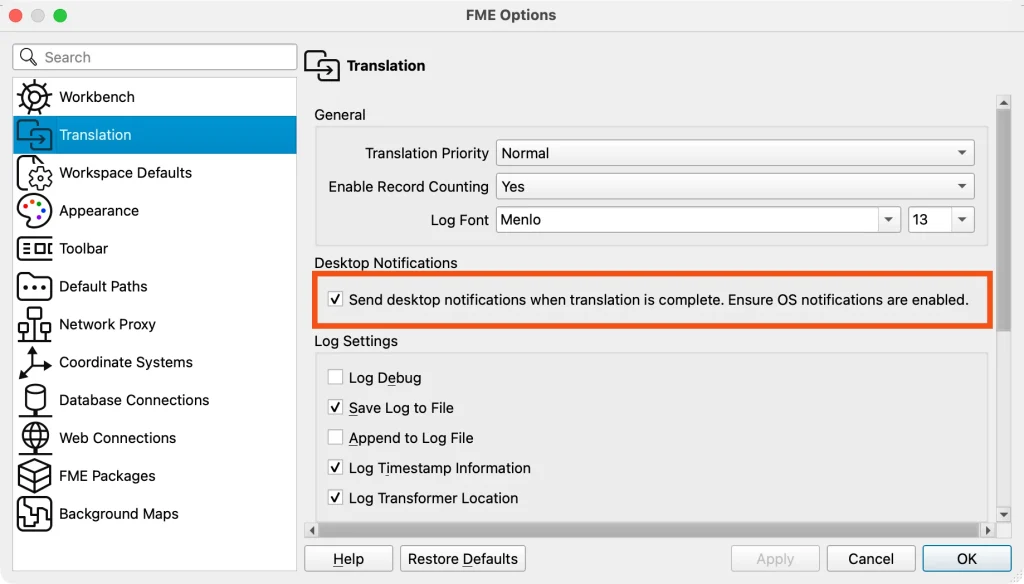
Desktop Alerts for Completed Translations
FME will ping your desktop when a translation finishes. Set it running, go make a coffee, and actually know when it’s done. Small thing but massive in practice.
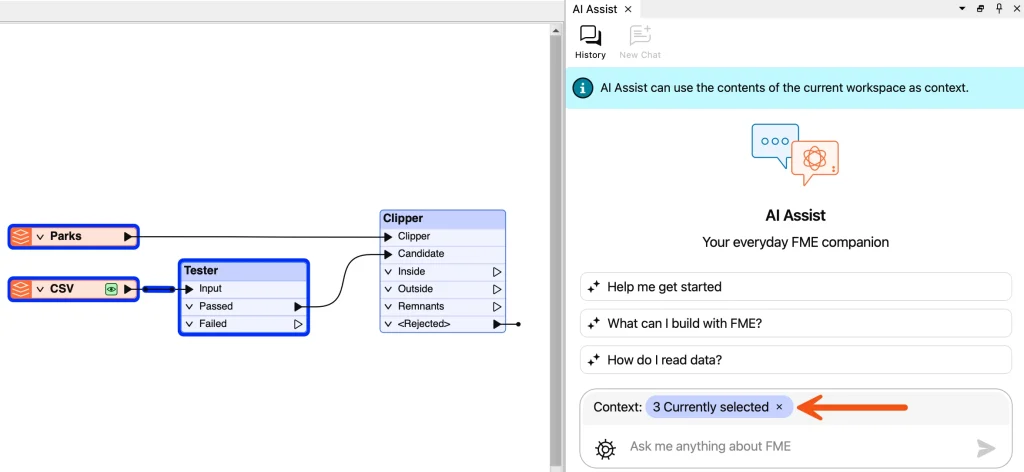
AI Assist Gets Context Visibility
FME shows you exactly which part of your canvas is being shared with AI Assist when you’re using it. Transparency and control in the AI loop.
Row Numbers in Table Interfaces
Tables throughout FME Form show row numbers. Again, small change but try troubleshooting a 10,000-row parameter dialog without them.
Improved Multiple Geometry Support
New tools, GeometryCopier, updates to GeometryNameSetter, GeometryRemover, GeometryExtractor make working with features that carry multiple geometry columns considerably less painful. FeatureMerger and FeatureJoiner also got updates to preserve separate geometry columns when combining streams.
ISO 8601 DateTime Support
Date and time handling across transformers, functions, and writers now preserves ISO 8601 formatting throughout. If you’ve ever had a DateTime format mysteriously mutate its way through a workflow, you’ll appreciate this more than most.
Security Improvements for FME Flow Apps
Flow Apps now use a token-less execution model, reducing the risk of credential exposure.
FME supports over 450 formats, and 2026.1 adds some interesting new entries:
PMTiles (Protomaps)
Cloud-optimised, single-file tile format designed for static hosting on platforms like S3, with no tile server required. Serverless map publishing is now a first-class FME workflow
HDF5
Widely-used scientific and sensor data format, now natively supported. Particularly useful for meteorological and earth observation datasets
New File Geodatabase Reader/Writer
Built on GDAL’s OpenFileGDB driver, this brings better cross-platform compatibility (including macOS Apple Silicon), support for newer data types, and improved performance
Delta Lake Reader is Production-Ready
Delta Lake workflows across AWS, Azure, and GCP are now fully supported, with DuckDB upgraded and Google Cloud Storage support restored
Databricks Reader
Spatial joins, H3 indexing and spatial aggregations can run directly inside Databricks without external processing. Writing support is coming in 2026.2.
Python 3.14
Embedded Python runtime has been upgraded, keeping FME compatible with the latest libraries. Existing custom transformers and scripts continue to work unchanged.
The Locus Take
The MCPCaller Transformer signals where Safe Software is heading, a future where FME is the integration and orchestration layer for AI-powered workflows, not just data transformation. Live Feature Caching makes the authoring experience meaningfully better. And the depth of new format support continues to make the; what can FME connect to? question easier to answer… almost everything.
For our clients, if you’re not yet on the upgrade path, now is a good time to think about it, these quarterly release updates are where the value accumulates fast.
Get in touch if you’d like to learn more or come along to one of our Locus FME Roadshow events where we’ll be exploring this release in more detail (including demos!).
Learn more about FME
Register for the Locus FME Roadshow 2026 coming to Auckland, Christchurch and Wellington – Register Now
Join FME Accelerator, our free, instructor-led 90 minute introduction to FME – Register Now
Download the FME playbook, a high-level overview to FME and Locus – Learn More